

Why DIY Seed?
Bitcoin was designed to be decentralized and censorship-resistant. To fully embrace this, you must control your private keys. Your seed is the foundation of your private key, and if you don’t generate it yourself in a secure, verifiable way, you're trusting others with your funds.
A DIY seed allows you to:
-
Ensure that no one else has access to your private key.
-
Avoid relying on hardware or software-generated seeds that could be compromised.
-
Gain confidence by understanding the seed creation process.
Risks of 3rd-Party Seed Generation
Many wallets generate a seed for you, but this comes with risks:
-
Weak Randomness – You must trust that the software or hardware wallet is using proper randomness (entropy) and not creating predictable seeds.
-
Backdoors & Compromises – Some wallets might have security flaws or even intentional backdoors that expose your seed.
-
Supply Chain Attacks – Pre-generated seeds (as found in some compromised hardware wallets) could mean attackers already have access to your Bitcoin.
How to Generate Your Own Seed
To eliminate these risks, you can create your own Bitcoin seed using secure, offline methods:
-
Generating true randomness: Use dice rolls to ensure strong entropy.
-
Convert randomness into a seed phrase: Use the BIP39 standard to turn random numbers into a mnemonic seed.
-
Verify the seed: Cross-check it with multiple tools to ensure accuracy.
-
Store it securely: Write it on durable materials like metal to protect against loss or damage.
The Power of Self Custody
By generating your own seed, you eliminate unnecessary trust in third parties. This aligns with Bitcoin’s core principles: self sovereignty, security, and decentralization. While it requires learning and careful execution, it’s one of the most empowering steps you can take in Bitcoin self custody!
By following this detailed step-by-step guide you will take full control of your financial future!
Requirements
To create your own DIY seed phrase securely, you'll need the following tools:
Casino Dice
Casino-grade dice are essential for generating true randomness (entropy). While it's possible to use a single dice, the process would be extremely slow. To speed things up, it's recommended to use at least 5 or 10 dice, allowing you to roll fewer times while still ensuring a high level of randomness. But it’s also okay to just save money and just use any old dice. Even if your dice are not perfect and have some bias, as long as you use several at a time, you will achieve sufficient randomness.
That said, you don’t need to spend extra money on special dice—any standard six-sided dice will work. Even if your dice have slight imperfections or biases, rolling several at once will balance out any inconsistencies and provide enough randomness for your needs
Airgapped computer
An air-gapped computer is a device that has never been connected to the internet and is physically incapable of doing so. This is crucial for securely generating and storing private keys. Suitable options include:
-
Raspberry Pi Zero 1.3, This model is highly recommended because it lacks built-in Wi-Fi and Bluetooth, reducing attack surfaces. However, it may be difficult to find.
-
Laptop or PC, This should be a computer where the Wi-Fi and Bluetooth modules have been physically removed, and the Ethernet port has been permanently disabled or damaged. This ensures that even if the computer is stolen, an attacker cannot extract the private key by connecting it to the internet.
Paper & Pen
You'll need a pen and paper to document the process of generating your seed phrase. However, this paper should only be used as a temporary record and must be destroyed (e.g., burned) after securely transferring the seed phrase to a more durable storage medium.
Metal Seed Storage
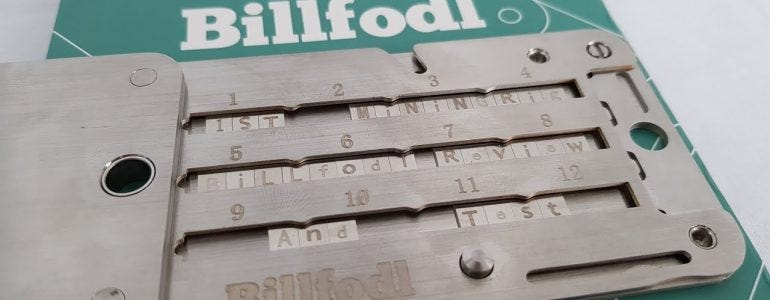
Once your seed phrase has been created, it should be permanently stored on a fireproof, waterproof, and tamper-resistant metal seed storage device. This protects your seed phrase from physical threats such as fire, water damage, and deterioration over time.
By using these tools and following best security practices, you can ensure that your seed phrase remains secure, private, and resistant to theft or loss.
Roll the Dice
Our goal is to generate a large, truly random binary number by rolling the dice.
Procedure:
Assign Binary Values
Before rolling the dice, you need to determine how each roll will be converted into a binary value. The following method ensures an equal probability of obtaining a 0 or 1:
-
If the die lands on 1, 2, or 3, it is assigned a value of 0.
-
If the die lands on 4, 5, or 6, it is assigned a value of 1.
Roll and Record
Roll the dice and record the results from left to right. Consistency is key—always read in the same order to maintain randomness. If it’s unclear which die is further to the left, re-roll those dice.
warning
It is crucial that the data is truly random. If it lacks randomness, there is a risk that someone else could reproduce the exact same sequence. This would allow them to regenerate your private key and potentially access all of your Bitcoin.
Format the Output
Create 23 rows of 11 binary digits each, plus a final 24th row containing only 3 digits.
-
For readability, separate each row into three groups: 4-4-3 (e.g., 1010 1101 011).
-
Keep the numbers neatly aligned in columns and leave space between rows for manual calculations later.
This structured approach will help you maintain accuracy and ensure a truly random binary sequence for your needs.
| # | |||||||||||
|---|---|---|---|---|---|---|---|---|---|---|---|
| 1) | 1 | 0 | 1 | 1 | 1 | 0 | 0 | 0 | 1 | 0 | 1 |
| 2) | 1 | 1 | 0 | 1 | 1 | 1 | 0 | 0 | 1 | 0 | 0 |
| 3) | 1 | 0 | 1 | 1 | 1 | 1 | 0 | 0 | 1 | 1 | 1 |
| 4) | 0 | 1 | 1 | 0 | 1 | 0 | 0 | 0 | 1 | 0 | 1 |
| 5) | 1 | 1 | 1 | 1 | 1 | 0 | 1 | 0 | 1 | 0 | 1 |
| 6) | 1 | 1 | 1 | 1 | 1 | 0 | 0 | 1 | 0 | 0 | 0 |
| 7) | 0 | 0 | 1 | 0 | 0 | 0 | 0 | 0 | 1 | 0 | 1 |
| 8) | 1 | 0 | 1 | 1 | 1 | 0 | 0 | 0 | 1 | 0 | 1 |
| 9) | 1 | 0 | 1 | 0 | 1 | 0 | 1 | 0 | 1 | 0 | 0 |
| 10) | 1 | 0 | 1 | 1 | 1 | 0 | 1 | 1 | 1 | 0 | 1 |
| 11) | 1 | 1 | 1 | 1 | 1 | 0 | 0 | 0 | 1 | 0 | 1 |
| 12) | 0 | 1 | 1 | 1 | 1 | 0 | 0 | 1 | 1 | 1 | 0 |
| 13) | 1 | 0 | 1 | 1 | 1 | 0 | 1 | 0 | 1 | 0 | 0 |
| 14) | 1 | 0 | 0 | 1 | 1 | 0 | 0 | 0 | 1 | 1 | 1 |
| 15) | 1 | 0 | 1 | 1 | 1 | 0 | 0 | 0 | 1 | 1 | 1 |
| 16) | 1 | 1 | 1 | 1 | 1 | 0 | 1 | 1 | 1 | 0 | 1 |
| 17) | 0 | 0 | 0 | 1 | 1 | 0 | 0 | 0 | 1 | 0 | 1 |
| 18) | 1 | 0 | 1 | 0 | 1 | 0 | 0 | 0 | 1 | 1 | 0 |
| 19) | 1 | 1 | 1 | 1 | 1 | 0 | 1 | 0 | 1 | 0 | 0 |
| 20) | 1 | 1 | 1 | 1 | 1 | 0 | 0 | 0 | 1 | 0 | 0 |
| 21) | 0 | 0 | 1 | 0 | 1 | 0 | 0 | 0 | 1 | 0 | 1 |
| 22) | 1 | 0 | 1 | 1 | 1 | 0 | 1 | 0 | 1 | 0 | 1 |
| 23) | 1 | 0 | 0 | 1 | 1 | 0 | 0 | 0 | 1 | 0 | 1 |
| 24) | 0 | 0 | 1 |
Now, let’s look at the total number of binary digits we’ll generate. In this case, we have 256 bits—which breaks down into 23 full sets of 11 bits each, with a partial 24th set containing only three bits.
Later, you’ll see why this matters, but for now, just understand that every 11-bit segment will be converted into a mnemonic seed word. If we divide 256 bits by 11, we get 23.27 words, which isn’t a whole number. Since a mnemonic seed must contain whole words, we don’t yet have enough bits to complete a 24-word seed.
To fix this, we need eight more bits, bringing our total to 264 bits. This allows us to cleanly divide the bits into 24 full sets of 11, each corresponding to a word in the mnemonic phrase. As you’ll see later, these final eight extra bits serve a crucial role in the process.
Calculate the Checksum
The last eight missing digits need to be calculated to create what's called a "checksum."
So, what exactly is a checksum? A checksum is a way for computers to verify that you haven't made a mistake when entering things like your credit card number or bank account details. It's a helpful tool that lets the computer alert you if you've made a typo—this is especially useful when dealing with your Bitcoin private key!
Generate the Hash Output
To calculate the checksum, you'll need to use your air-gapped computer (though it can be done by hand, but it is not covered in this guide as it is a long process). On Linux, open a terminal and type the command below. Be sure to replace my binary digits with your own random binary digits. Keep in mind that the sequence should be entered as one long line, even though it might look broken up in this example.
echo 1011100010111011100100101111001110110100010111111010101111110010000010000010110111000101101010101001011101110111111000101011110011101011101010010011000111101110001111111101110100011000101101010001101111101010011111000100001010001011011101010110011000101001 | shasum -a 256 -0
In simpler terms, this command takes the binary sequence you have just created with your dice, applies the SHA-256 hash function, and produces a unique output (the checksum) that verifies the seed is correct. This checksum is important for ensuring that no errors or typos were made when creating the seed.
That said, our output is:
52831c8346d7423d26648b51490f2d7ae0ddf172956f241a6bb8bdc0d887c292 ^-
Convert HEX to Binary
Now, let’s begin calculating the checksum.
Our goal is to convert the first two digits of our hash output into their four-digit binary equivalents. In this case, we have "5" and "2", which are in hexadecimal format. Hexadecimal is a number system that goes beyond the usual digits 0 to 9 by using letters A to F to represent the values 10 to 15.
The conversion process is showed in the below chart and consists of two steps:
1. HEX to Decimal
The first step is to convert the two hexadecimal digits into decimal numbers.
In our case, the hex digits "5" and "2" are directly equivalent to 5 and 2 in decimal. But if we had a "b" in the hexadecimal number, it would convert to 11 in decimal.
2. Decimal to Binary
Next, we convert the decimal numbers into their four-digit binary equivalents.
| HEX | Decimal | Binary |
|---|---|---|
| 0 | 0 | 0000 |
| 1 | 1 | 0001 |
| 2 | 2 | 0010 |
| 3 | 3 | 0011 |
| 4 | 4 | 0100 |
| 5 | 5 | 0101 |
| 6 | 6 | 0110 |
| 7 | 7 | 0111 |
| 8 | 8 | 1000 |
| 9 | 9 | 1001 |
| a | 10 | 1010 |
| b | 11 | 1011 |
| c | 12 | 1100 |
| d | 13 | 1101 |
| e | 14 | 1110 |
| f | 15 | 1111 |
The result is:
-
5 in binary is 0101 (4 bits)
-
2 in binary is 0010 (4 bits)
These four-digit binary numbers are the checksum, which we will add to the 24th line to finish off the final set of 11 binary digits. At this point, you should have a total of 264 digits (see the below diagram).
| # | |||||||||||
|---|---|---|---|---|---|---|---|---|---|---|---|
| 1) | 1 | 0 | 1 | 1 | 1 | 0 | 0 | 0 | 1 | 0 | 1 |
| 2) | 1 | 1 | 0 | 1 | 1 | 1 | 0 | 0 | 1 | 0 | 0 |
| 3) | 1 | 0 | 1 | 1 | 1 | 1 | 0 | 0 | 1 | 1 | 1 |
| 4) | 0 | 1 | 1 | 0 | 1 | 0 | 0 | 0 | 1 | 0 | 1 |
| 5) | 1 | 1 | 1 | 1 | 1 | 0 | 1 | 0 | 1 | 0 | 1 |
| 6) | 1 | 1 | 1 | 1 | 1 | 0 | 0 | 1 | 0 | 0 | 0 |
| 7) | 0 | 0 | 1 | 0 | 0 | 0 | 0 | 0 | 1 | 0 | 1 |
| 8) | 1 | 0 | 1 | 1 | 1 | 0 | 0 | 0 | 1 | 0 | 1 |
| 9) | 1 | 0 | 1 | 0 | 1 | 0 | 1 | 0 | 1 | 0 | 0 |
| 10) | 1 | 0 | 1 | 1 | 1 | 0 | 1 | 1 | 1 | 0 | 1 |
| 11) | 1 | 1 | 1 | 1 | 1 | 0 | 0 | 0 | 1 | 0 | 1 |
| 12) | 0 | 1 | 1 | 1 | 1 | 0 | 0 | 1 | 1 | 1 | 0 |
| 13) | 1 | 0 | 1 | 1 | 1 | 0 | 1 | 0 | 1 | 0 | 0 |
| 14) | 1 | 0 | 0 | 1 | 1 | 0 | 0 | 0 | 1 | 1 | 1 |
| 15) | 1 | 0 | 1 | 1 | 1 | 0 | 0 | 0 | 1 | 1 | 1 |
| 16) | 1 | 1 | 1 | 1 | 1 | 0 | 1 | 1 | 1 | 0 | 1 |
| 17) | 0 | 0 | 0 | 1 | 1 | 0 | 0 | 0 | 1 | 0 | 1 |
| 18) | 1 | 0 | 1 | 0 | 1 | 0 | 0 | 0 | 1 | 1 | 0 |
| 19) | 1 | 1 | 1 | 1 | 1 | 0 | 1 | 0 | 1 | 0 | 0 |
| 20) | 1 | 1 | 1 | 1 | 1 | 0 | 0 | 0 | 1 | 0 | 0 |
| 21) | 0 | 0 | 1 | 0 | 1 | 0 | 0 | 0 | 1 | 0 | 1 |
| 22) | 1 | 0 | 1 | 1 | 1 | 0 | 1 | 0 | 1 | 0 | 1 |
| 23) | 1 | 0 | 0 | 1 | 1 | 0 | 0 | 0 | 1 | 0 | 1 |
| 24) | 0 | 0 | 1 | 0 | 1 | 0 | 1 | 0 | 0 | 1 | 0 |
Binary to Decimal
Each of the 24 lines, consisting of 11 binary digits, must be converted to a decimal number manually on your airgapped computer or by using paper and pen. This is important because using online tools to convert binary to decimal could expose your seed phrase, which would compromise your security.
A bit about binary: In the binary system, there are only two digits: 0 and 1. The digits we’re familiar with (2, 3, 4, etc.) don’t exist here. So when counting, we start with 0, then 1. But after 1, there's no "2." The next number after 1 is “10” in binary, which is read as "one, zero" (not "ten"). This represents the decimal number 2. The next binary number is “11” ("one, one"), which is 3 in decimal.
In binary, the numbers increase like this:
-
“100” is 4,
-
“101” is 5,
-
“110” is 6,
-
“111” is 7,
-
“1000” is 8,
-
“1001” is 9, and so on.
With 11 binary digits, the smallest number is 0 (00000000000), and the largest is 2047 (11111111111).
To convert each line of binary digits, simply take each 11-digit sequence and convert it to decimal. You can do this in 2 ways:
Airgapped Computer
For example, to convert the first line, whose number is 10111000101, you’d type:
echo $((2#10111000101))
This will output 1477. You just need to replace the binary digits in the command with each 11-digit binary number and run the calculation.
Paper & Pen
At the top left of your page, write the following numbers from left to right, aligned with the binary digits below. Start with 1024 above the first column, then 512 above the second column, 256 above the third, and so on, halving the number each time until you reach 1 above the last (eleventh) column on the right.
Now, for each binary digit:
-
If the digit is 1, write down the decimal number directly above it.
-
If the digit is 0, write 0 or skip that number.
Add up all the numbers you wrote down. This sum is the decimal equivalent of the binary number.
For example, to convert the first line, whose number is 10111000101, you'd do:
1024+0+256+128+64+0+0+0+4+0+1
This will output 1477 which is the same number we got with the airgapped computer method.
Repeat this process for all 24 rows. You’ll now have 24 decimal numbers, each ranging from 0 to 2047.
| # | 1024 | 512 | 256 | 128 | 64 | 32 | 16 | 8 | 4 | 2 | 1 | TOT |
|---|---|---|---|---|---|---|---|---|---|---|---|---|
| 1) | 1 | 0 | 1 | 1 | 1 | 0 | 0 | 0 | 1 | 0 | 1 | 1477 |
| 2) | 1 | 1 | 0 | 1 | 1 | 1 | 0 | 0 | 1 | 0 | 0 | 1764 |
| 3) | 1 | 0 | 1 | 1 | 1 | 1 | 0 | 0 | 1 | 1 | 1 | 1511 |
| 4) | 0 | 1 | 1 | 0 | 1 | 0 | 0 | 0 | 1 | 0 | 1 | 837 |
| 5) | 1 | 1 | 1 | 1 | 1 | 0 | 1 | 0 | 1 | 0 | 1 | 2005 |
| 6) | 1 | 1 | 1 | 1 | 1 | 0 | 0 | 1 | 0 | 0 | 0 | 1992 |
| 7) | 0 | 0 | 1 | 0 | 0 | 0 | 0 | 0 | 1 | 0 | 1 | 261 |
| 8) | 1 | 0 | 1 | 1 | 1 | 0 | 0 | 0 | 1 | 0 | 1 | 1477 |
| 9) | 1 | 0 | 1 | 0 | 1 | 0 | 1 | 0 | 1 | 0 | 0 | 1364 |
| 10) | 1 | 0 | 1 | 1 | 1 | 0 | 1 | 1 | 1 | 0 | 1 | 1501 |
| 11) | 1 | 1 | 1 | 1 | 1 | 0 | 0 | 0 | 1 | 0 | 1 | 1989 |
| 12) | 0 | 1 | 1 | 1 | 1 | 0 | 0 | 1 | 1 | 1 | 0 | 974 |
| 13) | 1 | 0 | 1 | 1 | 1 | 0 | 1 | 0 | 1 | 0 | 0 | 1492 |
| 14) | 1 | 0 | 0 | 1 | 1 | 0 | 0 | 0 | 1 | 1 | 1 | 1223 |
| 15) | 1 | 0 | 1 | 1 | 1 | 0 | 0 | 0 | 1 | 1 | 1 | 1479 |
| 16) | 1 | 1 | 1 | 1 | 1 | 0 | 1 | 1 | 1 | 0 | 1 | 2013 |
| 17) | 0 | 0 | 0 | 1 | 1 | 0 | 0 | 0 | 1 | 0 | 1 | 197 |
| 18) | 1 | 0 | 1 | 0 | 1 | 0 | 0 | 0 | 1 | 1 | 0 | 1350 |
| 19) | 1 | 1 | 1 | 1 | 1 | 0 | 1 | 0 | 1 | 0 | 0 | 2004 |
| 20) | 1 | 1 | 1 | 1 | 1 | 0 | 0 | 0 | 1 | 0 | 0 | 1988 |
| 21) | 0 | 0 | 1 | 0 | 1 | 0 | 0 | 0 | 1 | 0 | 1 | 325 |
| 22) | 1 | 0 | 1 | 1 | 1 | 0 | 1 | 0 | 1 | 0 | 1 | 1493 |
| 23) | 1 | 0 | 0 | 1 | 1 | 0 | 0 | 0 | 1 | 0 | 1 | 1221 |
| 24) | 0 | 0 | 1 | 0 | 1 | 0 | 1 | 0 | 0 | 1 | 0 | 338 |
Look up BIP39 Words
BIP39 (Bitcoin Improvement Proposal 39) defines a list of 2048 words, arranged alphabetically. Each word in the list corresponds to a specific position, which is used to map a binary number to its matching word. For example, if the binary number you calculate corresponds to the number 1477, the word in that position on the list is "reward”.
-
The smallest possible value is 0 (binary: 00000000000), which corresponds to the word “abandon” — the first word on the list.
-
The largest possible value is 2047 (binary: 11111111111), which corresponds to the word “zoo” — the last word on the list.
Important
Computers count starting at 0. So, for example, the fifth item in a list is actually item number 4 (not 5). This is crucial when looking up words on the BIP39 list.
The official BIP 39 word list on GitHub displays line numbers starting from 1, not 0. This creates a slight mismatch between what you see in the list and the actual position in the BIP 39 specification.
For instance, the first 11-digit binary number you’ve calculated equals 1477 in decimal. When you look at the GitHub list, you’ll find the word in line 1478 (since GitHub’s line numbers start at 1). This word will be “reward.”
Go ahead and look up each decimal value — remember to add 1 to your calculated result to match the line numbers on GitHub — and find the corresponding word for all 24 binary rows.
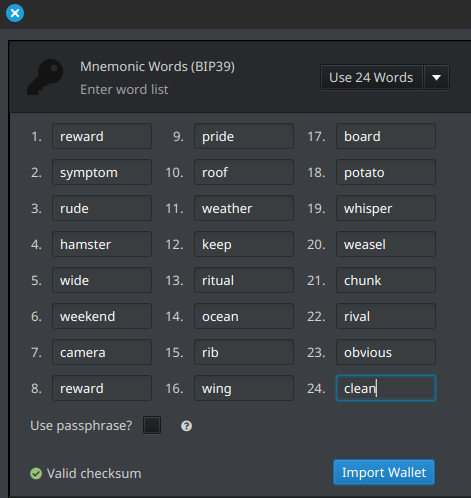
If you’ve made it this far, congratulations! You’ve now created a valid 24-word Bitcoin mnemonic seed.
| # | BIP39 | GitHub | Word |
|---|---|---|---|
| 1) | 1477 | 1478 | reward |
| 2) | 1764 | 1765 | symptom |
| 3) | 1511 | 1512 | rude |
| 4) | 837 | 838 | hamster |
| 5) | 2005 | 2006 | wide |
| 6) | 1992 | 1993 | weekend |
| 7) | 261 | 262 | camera |
| 8) | 1477 | 1478 | reward |
| 9) | 1364 | 1365 | pride |
| 10) | 1501 | 1502 | roof |
| 11) | 1989 | 1990 | weather |
| 12) | 974 | 975 | keep |
| 13) | 1492 | 1493 | ritual |
| 14) | 1223 | 1224 | ocean |
| 15) | 1479 | 1480 | rib |
| 16) | 2013 | 2014 | wing |
| 17) | 197 | 198 | board |
| 18) | 1350 | 1351 | potato |
| 19) | 2004 | 2005 | whisper |
| 20) | 1988 | 1989 | weasel |
| 21) | 325 | 326 | chunk |
| 22) | 1493 | 1494 | rival |
| 23) | 1221 | 1222 | obvious |
| 24) | 338 | 339 | clean |
Now, the last step is to use your seed phrase to verify that the 24 words were correctly generated. You can install a software wallet, like Sparrow Wallet, on your airgapped computer and enter the seed words. If they’re rejected, it means there was an error during the process. Sparrow will quickly show an error if there's a mismatch, typically because the checksum doesn't match. So, take your time and carefully double-check each step!
Backup your Seed
Your Bitcoin seed phrase is the key to your funds. If lost or compromised, your Bitcoin is gone forever. That’s why securing it properly is critical. While paper and digital backups can degrade, get lost, or be destroyed, metal seed storage offers a durable, fireproof, and waterproof solution.
Why Use Metal Seed Storage?
-
Fire & Water Resistance: Unlike paper, metal plates withstand extreme temperatures and flooding.
-
Durability: Metal does not degrade over time like paper or electronic storage.
-
Tamper Resistance: Securely stored metal backups prevent unauthorized access.
-
Longevity: A well-engraved or stamped metal seed plate can last a lifetime, ensuring your Bitcoin is recoverable even decades later.
How to Store Your Metal Backup Safely
-
Keep it in a secure location (safe, hidden vault, or safety deposit box).
-
Consider splitting your seed into multiple secure locations.
-
Avoid storing it digitally or in places prone to theft or destruction.
By using a high-quality metal seed storage solution, you ensure your Bitcoin remains secure, regardless of disasters or time. Your Bitcoin is only as safe as your seed backup, protect it wisely.