#

vpn

(14 articles)

Proper use of VPN or Tor

Anonymity and Pseudonymity are very important to have **PRIVACY** in cyberpsace, resulting in **FREEDOM** . We have useful tools to have privacy: PGP, Bitcoin, decentraliced systems, VPN... 🛡 But today, let's talk about the last one, VPN/Tor. There is a lot of advice that we can get to achieve anonymity but, let's focus on the next argument: > "Privacy is the ability to reveal information when, where, and to whom you want, selectively. Using a service like VPN/Tor may not always ensure your privacy. ## When should I NOT use VPN/Tor? You have heard that VPN/Tor hides you from the Internet, makes you invisible!! 👻 Well, the one who is invisible is not you, it's your IP. While a VPN/Tor may hide your IP, the websites and applications that you use with a username or email will know who you are. Let's take an example: You are browsing the internet through Tor, and you want to see some cat videos on YouTube very privately 🕵🏻‍♂️ You enter the URL, log in with your Google account, and... STOP! Do you think you are anonymous? Maybe your ISP(Internet Service Provider) doesn't know what website you are visiting, but now Google knows two things about you: 1. You like cats 😸 2. **You use TOR** 🔍 Probably websites doesn't care if you use clearnet, VPN, Tor or Bluetooth, but the state does. You will never know when your state is going to start going after those who use privacy tools and when it will call Google to see what accounts are connected using VPN/Tor. > Just a short idea: Digital ID in UK So, for the eyes of the state, could be better to be a normal matrix human. ## When should I use VPN/Tor? You may want to use VPN/Tor in every service that you don't need to identify, or you can change the identification easily.🎭 Services like that are browsable internet, Nostr, bitcoin network, bisq... Even services that are not interested in who you are, you can change your email, migrate your account, or create a new one. 🔄 It's important to remember that **privacy** is like a knife.🔪 Very useful, but not everyone needs to know you use one. --- Thank you for the time you spend reading this. If you consider this useful, I appreciate reposts, quoting, follow and zap 🧡⚡ P.S I'm trying to improve my English skills with Nostr, I will thank any advice or correction.

Всё для VPN

Чтобы иметь бесплатный, быстрый и устойчивый к блокировке VPN нам нужны всего 2 вещи: 1. Клиент V2ray (приложение для использования VPN) 2. Файлы конфигурации (по сути данные VPN-серверов) ## Клиенты V2ray: 1. Инструкция по установке для Windows и Linux: https://github.com/hiddify/Hiddify-Manager/wiki/Tutorial-for-HiddifyNext-app#adding-a-profile-to-the-app *P.S. Если возникли проблемы с Hiddify-Next — пробуйте установить [Necoray](https://github.com/MatsuriDayo/nekoray)* 2. Инструкция по установке для Android: https://github.com/hiddify/Hiddify-Manager/wiki/Tutorial-for-V2rayNG-app#add-configs-to-the-app *P.S. Если возникли проблемы с V2rayNG — пробуйте установить [HiddifyNext](https://github.com/hiddify/hiddify-next/releases) ([инструкция](https://github.com/hiddify/Hiddify-Manager/wiki/Tutorial-for-HiddifyNext-app#adding-a-profile-to-the-app))* 3. Инструкция по установке для Windows и Linux: https://github.com/hiddify/Hiddify-Manager/wiki/Tutorial-for-V2Box-app#add-subscription-links-to-the-app (лучше для iOS) + https://github.com/hiddify/Hiddify-Manager/wiki/Tutorial-for-Streisand#add-subscription-link (лучше для Mac) *P.S. Если возникли проблемы с V2Box и Streisand — пробуйте установить [Hiddify-Next](https://github.com/hiddify/hiddify-next/releases) или [ShadowRocket](https://github.com/hiddify/Hiddify-Manager/wiki/Tutorial-for-ShadowRocket-app#add-subscription-link-to-the-app)* ## Источники файлов конфигураций: 1. https://outlinekeys.com/ 2. https://proxytype.com/ 3. https://vlesskey.com/ 4. https://vpnkeys.org/ 5. https://openproxylist.com/v2ray/ 6. https://github.com/Epodonios/v2ray-configs 7. https://github.com/barry-far/V2ray-Configs?tab=readme-ov-file 8. https://github.com/M-Mashreghi/Free-V2ray-Collector 9. https://github.com/skywrt/v2ray-configs 10. https://github.com/0xdolan/v2ray_config_generator

A VPN is Not Magic

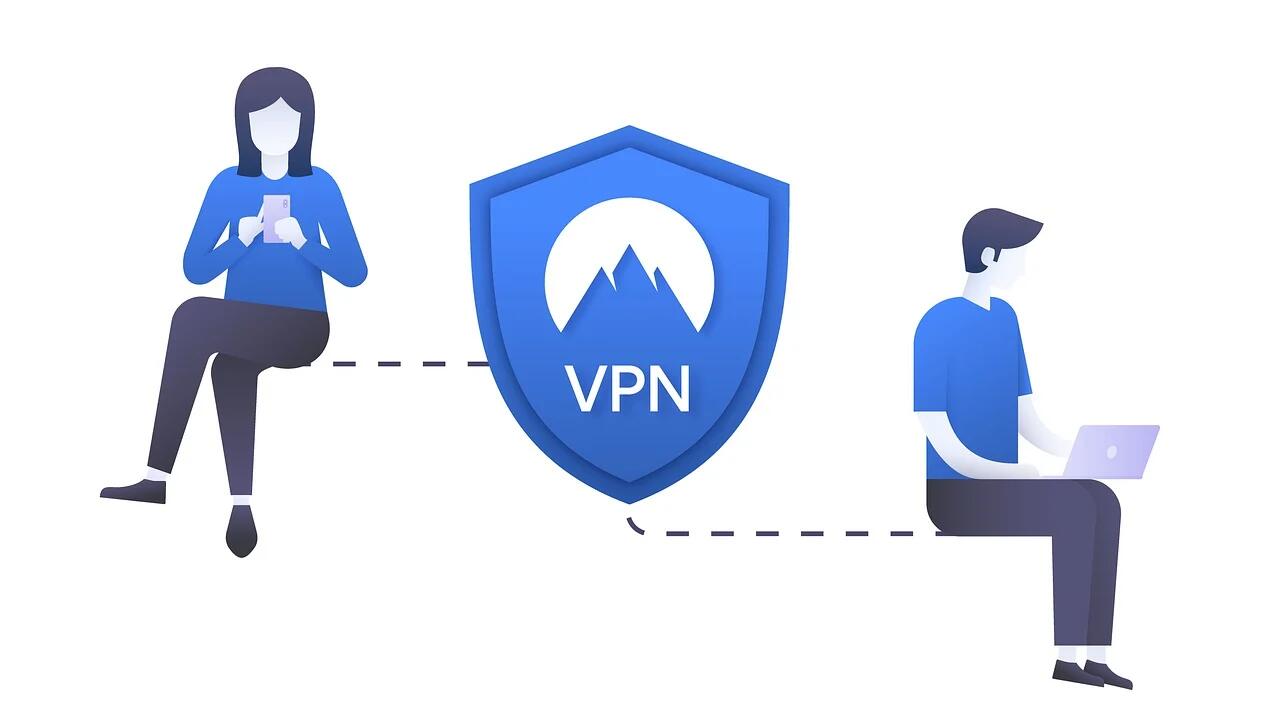
A VPN is Not Magic A VPN is a virtual private network. A VPN service provides an encrypted tunnel between your device and a server they own or rent. You then connect to the internet from this server thus making your IP address appear to the wider internet as the server IP. That's it. That's all it does. Your Device -> VPN -> Website Your Device sees that you are connecting to a website through a VPN. Your ISP sees that you are connecting to a VPN server but nothing after. The website sees that someone from a VPN is connecting to them but doesn't know who. The VPN sees your device connected to their server and that you then connected to a website. VPN Anonymity and Privacy VPNs do a lot to protect your privacy, they keep your ISP from seeing and logging every single thing you do online and they spoof your location and IP to any website that you visit. Although this website protection isn't 100% anonymous because of cookies, trackers, and if you have to log into a site with your information. If you are using a VPN on a mobile phone then you are still broadcasting your location to the cell towers even if you are not telling the website you are browsing. Then there is the elephant in the room. The VPN knows all and sees all. How much do they log? How long do they save it? Can you trust them? This is going to vary VASTLY between VPN providers. I always prefer if they are setup where they cannot know the information in the first place and limit what I tell them in the first place by paying through the use of bitcoin or monero. Just because they have a no log "policy" in place it doesn't always fill me with confidence. VPN Security How much security does a VPN give you? Some in certain circumstances but not a lot. A VPN is not going to stop malware or viruses. A VPN can provide some protection from a man in the middle or evil twin attack as it provides a encrypted tunnel between your device and the VPN server, so always use a VPN when joining public WIFI spots. Just remember a VPN cannot protect you downstream on the connection between the VPN server and the website, always use secure encrypted connections and be aware that MITM attacks can still happen on the backside. A VPN can prevent DDoS attacks since the attacker doesn't know your real IP address and a fantastic use of VPNs is to protect IoT devices. Those smart devices around your home love to scream out all their data insecurely and a VPN can change their IP and encrypt their data in transit protecting them from hacking. VPN Legality In many countries VPNs are banned, blocked, or outright illegal: Bahrain Belarus China Cuba Egypt Iran Iraq Libya Myanmar North Korea Oman Russia Syria Turkey Turkmenistan UAE Uganda Venezuela Vietnam --- Advocating for privacy does not finance itself. If you enjoyed this article, please consider zapping or sending monero 82XCDNK1Js8TethhpGLFPbVyKe25DxMUePad1rUn9z7V6QdCzxHEE7varvVh1VUidUhHVSA4atNU2BTpSNJLC1BqSvDajw1

The Secret Life of Your Internet: Why You Need a Virtual Private Network (VPN)

Alright, let’s get one thing straight: you’re scrolling through your phone, shopping online, maybe even working from home. But here’s the thing – someone might be watching. Not in the creepy stalker way, but in the “is that company really needing my data?” kind of way. That’s where a Virtual Private Network (VPN) comes in, saving you from the prying eyes of marketers, governments, and even your own internet provider. **What Does a VPN Do?** A VPN creates a secure, encrypted connection between your device and a VPN server. This allows you to browse the internet anonymously, keeping your online activities private from your Internet Service Provider (ISP), network administrators, and even hackers. When you connect to a VPN, your internet traffic is routed through an intermediary server, making it difficult for anyone to track your online movements. **Why You Need a VPN: Privacy edition** - Hiding Your IP Address Every time you jump online, your device gets an IP address, like a digital ID. If you don’t use a VPN, everyone can see this ID, making it easy for advertisers and governments to track your every move. - [X ] *Myth:* A VPN hides my IP address from everyone. - [X] *Reality:* A VPN hides your IP address only from the websites you visit and your ISP. Your internet service provider still knows you're using a VPN, but they won't be able to see what sites you're visiting. Your VPN knows what sites you are visiting and *may* know who you are as well. - Bypassing Censorship Ever tried accessing something that’s blocked in your country? A VPN can help you bypass those restrictions, letting you watch the latest shows, access social media, or even download books without getting flagged as a troublemaker. - Protecting Your Data When you connect to public Wi-Fi – like at a café or airport – you’re basically handing over your data on a silver platter. A VPN encrypts this data, so even if someone intercepts it, they can’t decode it. Think of it as adding an extra layer of security. - Avoiding Surveillance Companies and governments love collecting data. From what you search to who you talk to, there’s a lot of stuff that’s none of their business. A VPN ensures that only you know where you’ve been online. - Safeguarding Your Personal and Professional Life Whether you’re working from home or just shopping for a present, a VPN keeps your activities private. It’s like having a secure safe for all your online stuff, so no one can snoop. - Stopping Targeted Ads Companies track your browsing habits to send you ads that follow you around the internet. A VPN breaks this cycle, making sure those creepy “you might like” ads stop following you around. - No Logs Policy Some VPNs keep records of your activity, which means they could be handed over if the government comes knocking. But with a no-logs policy, nothing is stored – *they promise ;)* - The Dark Side of Free VPNs Before you jump into using a free VPN, think twice. Free services often come with a catch: they might sell your data to advertisers or even track your activity themselves. It’s like getting a free hotdog at a gas station – it sounds great, but you’ll probably regret it later. **How to Use a VPN (Because You’re Not a Tech Wizard)** - Choose the Right Provider Go for a reputable service that offers strong encryption and a no-logs policy. Look for options with a kill switch, which stops any data from being leaked if the connection drops. I prefer ones you can pay annoymously but that may be overkill for most people. - Download and Install Once you pick a provider, download the app to your device. It’s not rocket science, but it does require a bit more than just opening an email. - Set It Up Most VPNs have user-friendly interfaces. Just click “Connect” and you’re good to go. You might need to enter your login details or use a password from your provider. **The Final Word** Using a VPN isn’t about being a hacker or someone with something to hide. It’s about respecting your privacy and having control over what you share online. In today’s world, where companies and governments are constantly getting more creative about how they collect data, it’s practically a requirement if you want to stay ahead of the curve. So there you have it – the secret life of your internet. With a VPN, you’re not just protecting yourself; you’re making sure that your digital footprint is as small as possible. Whether you’re at home or on the go, a VPN gives you the freedom to surf, shop, and work without anyone watching your every move. And hey, if you’re still not convinced, just think about it this way: imagine your internet connection as a crowded public space. Without a VPN, everyone’s staring at you. With one, you’re wearing a mask, and no one’s the wiser. --- Advocating for privacy does not finance itself. If you enjoyed this article, please consider zapping or sending monero 82XCDNK1Js8TethhpGLFPbVyKe25DxMUePad1rUn9z7V6QdCzxHEE7varvVh1VUidUhHVSA4atNU2BTpSNJLC1BqSvDajw1

VPN (Rede Virtual Privada)

é uma tecnologia que permite criar uma conexão segura e privada entre um dispositivo e a internet. É como uma espécie de túnel privado que passa por cima da internet pública, criptografando seus dados e mascarando seu endereço IP para proteger sua privacidade e segurança online. A história da VPN remonta ao final dos anos 1990, quando as empresas começaram a usar conexões dedicadas (linhas alugadas) para conectar suas redes corporativas e permitir que seus funcionários trabalhassem remotamente. Essas conexões dedicadas eram caras e difíceis de configurar, o que levou à criação das primeiras VPNs baseadas em software. A primeira VPN comercialmente disponível foi a Redes Privadas Virtuais (RPV), lançada pela Microsoft em 1996. Desde então, várias empresas e organizações começaram a usar VPNs para proteger seus dados confidenciais e permitir que seus funcionários trabalhassem remotamente de forma segura. Como funciona a VPN? Quando você se conecta a uma VPN, seu dispositivo estabelece um canal criptografado de comunicação com um servidor remoto. Todo o tráfego de dados entre o seu dispositivo e o servidor remoto é criptografado, o que significa que é transformado em códigos que só podem ser lidos por seu dispositivo e pelo servidor remoto. Além disso, quando você usa uma VPN, seu endereço IP é substituído pelo endereço IP do servidor remoto. Isso significa que sua localização física e outros dados pessoais não são facilmente rastreados por sites que você visita e outros usuários da internet. Por que usar uma VPN? Existem várias razões pelas quais você pode querer usar uma VPN. Algumas das principais razões incluem: • Acesso a conteúdo restrito geograficamente: Se você estiver em um país que restringe o acesso a certos sites ou serviços, uma VPN pode permitir que você os acesse como se estivesse em outro lugar. Por exemplo, se você estiver no Brasil e quiser acessar um site que só está disponível nos EUA, uma VPN pode permitir que você se conecte a um servidor nos EUA e acesse o site como se estivesse lá. • Segurança e privacidade online: Quando você usa uma VPN, suas informações são criptografadas e protegidas contra hackers e outros invasores que podem tentar interceptar suas informações. • Proteção de informações pessoais: Quando você está usando uma rede Wi-Fi pública (como em um café ou aeroporto), outras pessoas na mesma rede podem potencialmente interceptar suas informações pessoais e senhas. Uma VPN pode ajudar a proteger suas informações contra esses ataques. • Evitar rastreamento de anúncios: Muitos sites e anunciantes rastreiam sua atividade online para enviar anúncios personalizados. Usar uma VPN pode ajudar a evitar esse rastreamento e manter sua atividade online mais privada. As VPNs estão disponíveis em vários tipos e preços, desde serviços gratuitos até soluções corporativas mais avançadas. Ao escolher uma VPN, é importante verificar a política de privacidade da empresa para garantir que eles não compartilhem suas informações pessoais com terceiros. Além disso, algumas VPNs podem diminuir a velocidade da sua conexão à internet, então é importante escolher um serviço com uma boa reputação e boa qualidade Eu uso a Mullvap VPN.. uma VPN é uma ferramenta importante para manter sua segurança e privacidade online. Com a capacidade de criptografar suas informações, mascarar seu endereço IP e permitir o acesso a conteúdo restrito geograficamente, as VPNs são uma ótima opção para proteger sua presença online.