#

tor

(34 articles)

Run Your Own Nostr Relay on Your Android Phone

You don't need a server. You don't need to pay for hosting. Your Android phone is enough to run a personal Nostr relay, accessible from anywhere, over Tor, for free. This guide covers: 1. Installing apps via **Zap Store** 2. Setting up **Citrine** as your relay 3. Exposing it over Tor with **Orbot** 4. Connecting from desktop browsers using **Tor + FoxyProxy** --- ## Step 1: Get Zap Store [Zap Store](https://zapstore.dev) is a Nostr-native app store. Apps are published by their creators directly on Nostr, so you can follow the developer, see their other work, and zap them to support development, all without ads or shady monetization. Discovery can take some getting used to, but there are genuinely useful apps there that you won't find pushed by algorithm or paid placement. If someone you follow builds an app, you can find it on Zap Store and follow their work directly. Install Zap Store first. We'll use it to install the other apps in this guide. --- ## Step 2: Install and Configure Citrine **Citrine** is a Nostr relay that runs locally on your Android phone. It's made by the same developer as **Amber** (the popular Nostr signer app), which is a good trust signal. Install it from Zap Store (or Play Store). Once installed, you have a few options for how permissive your relay is: ### Option A: Personal relay only Only store events from your pubkey or events that mention you. Your relay stays small and relevant to you only. Good default for most people. ### Option B: Open relay with auto-cleanup Allow anyone to publish events to your relay, but run automatic cleanup so old events get deleted. You can configure it to never delete your own events while cleaning up everything else. ### Option C: No filtering Accept and keep everything. Generous, but be aware: your relay is open to spam and your storage will fill up over time. Pick what fits your use case. After configuring, Citrine will start listening on a local port (default: `4869`). Note this port number — you'll need it in the next step. --- ## Step 3: Expose Your Relay Over Tor with Orbot Your relay is running, but it's only accessible locally on your phone. To reach it from other devices and networks, you'll use **Orbot** to create a Tor hidden service (`.onion` address). Install Orbot from Zap Store or Play Store. ### Create a hidden service 1. Open Orbot 2. Go to settings and find **Hidden Services** (or "Tor Hidden Services") 3. Add a new hidden service pointed at the port Citrine is using (e.g. `4869`) 4. Orbot will generate a `.onion` address. Save this, it's your relay address ### Whitelist Citrine in Orbot In Orbot's app list, enable Tor **only for Citrine**. This routes Citrine's traffic through Tor but leaves all your other apps unaffected. ### Set Orbot as Always-On VPN Go to **Android Settings → Network → VPN**, find Orbot, and enable **Always-on VPN**. This makes Orbot start automatically when your phone boots, keeping your relay reachable without manual intervention. > Do not enable the "Block connections without VPN" / kill switch option. Since > only Citrine is whitelisted, enabling it would cut internet access for all > your other apps. Your relay is now live. The `.onion` address works over mobile data, Wi-Fi, any network, no port forwarding, no static IP needed. --- ## Step 4: Add Your Relay to Your Nostr Clients Your `.onion` relay address looks like: `ws://youraddress.onion` Add it to your relay list in your Nostr client. Most mobile Nostr apps (Yakihonne, Amethyst, etc.) have built-in Tor support and will connect to `.onion` relays automatically once you add the address. --- ## Step 5: Connect from Desktop Most mobile apps work out of the box, but desktop browsers can't resolve `.onion` addresses natively. Fix this with Tor + FoxyProxy. ### Install Tor You need Tor running locally. Install it however you prefer. On macOS and Linux, Homebrew is the easiest way: ```bash brew install tor brew services start tor ``` Homebrew itself can be installed from [brew.sh](https://brew.sh). Once running, Tor listens on `localhost:9050` (SOCKS5). ### Install FoxyProxy Install the **FoxyProxy** extension for Firefox or Chromium-based browsers. ### Configure FoxyProxy 1. Click the FoxyProxy icon → **Options** 2. Go to **Proxies** → **Add** 3. Fill in: - **Title:** Onion Resolver (or anything you like) - **Type:** SOCKS5 - **Hostname:** `127.0.0.1` - **Port:** `9050` 4. Scroll down to **Proxy by Patterns** → **Add Pattern** - **Title:** onion - **Pattern:** `*.onion` 5. Save 6. Back in FoxyProxy popup, switch mode to **Proxy by Patterns** Now your browser will route only `.onion` addresses through Tor, leaving all normal traffic unchanged. The goal here is connectivity, not anonymity. You're just making `.onion` addresses resolvable. Open your web-based Nostr client (e.g. Yakihonne web, Primal) and add your relay. It will connect. --- ## You're Done You now have a personal Nostr relay running on your phone, reachable from anywhere in the world. No server, no fees, no central point of failure. Your data lives on your device.

Services without DNS: an identity-first model using Nostr - Now with punch-able Proof of Concept

![image](https://image.nostr.build/75966e88f99debffe0bd09a67eddf60caa94ce58b4654f88097a810f7d08c60d.png) ## Services without DNS: an identity-first model using NCC This project demonstrates a working proof of concept for running and discovering services without relying on DNS. Instead of names and registrars, services are anchored to cryptographic identities and published over Nostr using signed, immutable records. The result is a system where ownership, reachability, and trust are decoupled, verifiable, and client-resolved. DNS becomes optional, not foundational. > *This work is a proof of concept and reference implementation. The specifications, libraries, and sidecar are under active development and should not yet be considered production-hardened. The goal is to validate the model, explore client and relay behaviour, and provide a concrete basis for further review and iteration.* Although this project is demonstrated using Nostr relays, the model is **service-agnostic**. NCC-02 and NCC-05 apply to any networked service, including APIs, web services, media endpoints, **and full web applications**. Relays provide the discovery and distribution backbone. The service itself does not need to be a relay, or even Nostr-aware, to participate. This includes standard web apps. A web application can be discovered, resolved, and reached via NCC records, with clients resolving identity and endpoints independently of DNS. --- ### The components #### NCC-02 – Identity-bound service ownership NCC-02 defines how a Nostr identity asserts ownership of a service. An NCC-02 record is a signed Nostr event that binds: * a service identifier using the `d` tag, * to a controlling npub, * with optional descriptive metadata. This record answers a single question: **who owns this service?** Because the event is signed by the service key, ownership is cryptographically verifiable. Any client can confirm that the service belongs to that identity without relying on DNS, registries, or central authorities. Key properties: * Services exist as identities, not hostnames * Only the private key holder can update or revoke the record * Multiple services can exist under one identity, distinguished by `d` * Updates are expressed as new signed events, not mutable records NCC-02 does not describe where a service runs or how to reach it. It is purely the ownership anchor. --- #### Service record attestations Service record attestations extend NCC-02 by allowing **other identities** to make signed statements *about* a service, without changing ownership. An attestation is a separate Nostr event that references an NCC-02 service record and asserts some claim about it. Critically: * The attester does not control the service * The attestation does not modify or replace the NCC-02 record * The claim stands on the reputation of the signer Ownership remains singular. Claims about the service can be plural. Attestations are intentionally generic and client-interpreted. They can represent: * operational responsibility * observed availability * validation or compliance checks * authorisation assertions The NCC system does not interpret or enforce these claims. Clients decide: * which attesters they trust * how many attestations matter * how to handle conflicting or missing attestations Attestations provide **evidence**, not authority. They replace central trust anchors with explicit, signed statements evaluated client-side. --- #### NCC-05 – Cryptographic location resolution NCC-05 defines how a service publishes **where it can be reached**, independently of DNS. An NCC-05 record is associated with an NCC-02 service and contains one or more **locators**, each describing a concrete endpoint: * IPv4 * IPv6 * Tor onion services Locators may be public or encrypted using NIP-44, allowing private endpoints to be published safely. Key properties: * Endpoints are cryptographically bound to the service identity * Multiple locators can coexist in parallel * Endpoints can rotate without changing identity * Clients resolve locations by following identities, not names NCC-05 does not proxy traffic, establish tunnels, or provide anonymity by itself. It is strictly a location description and resolution mechanism. --- ### Potential service patterns NCC-05 enables a range of service models beyond simple dynamic IP resolution: * **Private and invite-only services** Encrypted locators allow endpoints to be shared only with authorised pubkeys. * **Paid or subscription services** Access to locators can be gated behind one-off payments or ongoing zap-based subscriptions, with npubs removed from records or endpoints rotated as needed for easy user management. * **Ephemeral services** Short-lived APIs, temporary collaboration endpoints, or time-boxed access using tight TTLs. * **Peer-to-peer rendezvous** Two peers discover each other’s endpoints without public signalling, registrars, or coordination servers. * **Agent and automation backchannels** Bots or agents briefly exposing private control or callback endpoints. * **Web apps without DNS** Standard web applications reachable via IP or onion, discovered and resolved through identity-bound records instead of hostnames. * **Onion-only and censorship-resistant services** Services that never publish a public endpoint and rely entirely on private resolution. * **Infrastructure mobility and failover** Moving services between hosts or networks, or publishing multiple locators with deterministic priority. Relays act only as the distribution backbone. The services themselves can be arbitrary protocols and do not need to be Nostr-aware. --- ![image](https://image.nostr.build/c5e8bff6098c3911966e026e5433512101bf3aae68075c9cb917a029782bd7e3.png) #### NCC-06 – Sidecar and operational control plane NCC-06 operationalises NCC-02 and NCC-05. The sidecar is a local daemon that: * monitors services across IPv4, IPv6, and Tor * detects meaningful changes in endpoints, certificates, or metadata * publishes updated NCC-02 and NCC-05 records when required * sends encrypted admin notifications using NIP-44 * supports secure remote administration via NIP-46 The sidecar does **not** forward traffic and is **not** a proxy. It acts as a publisher, monitor, and control plane that keeps service records accurate and current. Because service identity is decoupled from network location, the sidecar enables rapid **endpoint and metadata rotation** under a stable identity. Services can move hosts, rotate IPs or onion addresses, update TLS fingerprints, or change publication relays and have the new state published within minutes. Changing the service’s npub creates a new identity and is treated as a distinct service. ![image](https://image.nostr.build/d793df163b2112a9576675909fe67c59ad9fded025f28a4ed1699fa3b1d18ccc.png) --- ### The client’s role This model only works because the client is an active participant rather than a passive resolver. The reference client shows how a client discovers NCC-02 service records, verifies ownership, and then resolves NCC-05 locator records to determine where a service can actually be reached. When locators are private, the client handles decryption using NIP-44 and decides which endpoints it is authorised to see. The client is also responsible for correlating service records, locator records, and any attestations into a single, coherent view of a service. Trust is not implicit. Each client applies its own policy about which attestations to accept, which identities to trust, and when to fail closed. Endpoint selection is likewise a client decision. The client chooses between multiple locators deterministically, respecting priority, expiry, and freshness, and automatically follows changes as new records are published. When endpoints rotate or infrastructure moves, the client converges on the new state without manual reconfiguration. Connections are made directly to the resolved service endpoints. Where required, the client can route traffic to onion services using a local bridge, allowing standard web applications and browsers to participate without special network configuration. In this architecture, relays act purely as the distribution layer and the sidecar keeps service records accurate over time. The client is where meaning is enforced. What to trust, where to connect, and how to react to change are all resolved locally, without any global authority. ![image](https://image.nostr.build/7ab4475701d776d2dc1648dc93935d0ae469af7129929f5172b2f2f2f87c766e.png) --- ### How it fits together * **NCC-02** answers: Who owns this service? * **Attestations** answer: What do others claim about it? * **NCC-05** answers: Where can it be reached? * **NCC-06** keeps all of the above accurate over time All components use: * immutable, signed Nostr events * client-side resolution * no DNS, PKI, or naming authorities --- ### Why this matters DNS-based service discovery couples identity, location, and trust into a brittle hierarchy. NCC separates these concerns: * identity is cryptographic * location is declarative and rotatable * trust is explicit and plural * resolution is client-driven This makes services more portable, harder to censor, easier to migrate, and independently verifiable. DNS becomes optional, not foundational. --- ### Code and references * Proof-of-concept client [https://github.com/imattau/ncc-client](https://github.com/imattau/ncc-client) * NCC-06 sidecar and library [https://github.com/imattau/ncc-06](https://github.com/imattau/ncc-06) * NCC-02 spec and library [https://github.com/imattau/ncc-02](https://github.com/imattau/ncc-02) * NCC-05 spec and library [https://github.com/imattau/ncc-05](https://github.com/imattau/ncc-05) NPM Libraries used: `ncc-02-js`, `ncc-05-js` #nostr #builders #privacy #p2p #tor #dns #decentralization #nostrdevs #ncc #npm #js

Proper use of VPN or Tor

Anonymity and Pseudonymity are very important to have **PRIVACY** in cyberpsace, resulting in **FREEDOM** . We have useful tools to have privacy: PGP, Bitcoin, decentraliced systems, VPN... 🛡 But today, let's talk about the last one, VPN/Tor. There is a lot of advice that we can get to achieve anonymity but, let's focus on the next argument: > "Privacy is the ability to reveal information when, where, and to whom you want, selectively. Using a service like VPN/Tor may not always ensure your privacy. ## When should I NOT use VPN/Tor? You have heard that VPN/Tor hides you from the Internet, makes you invisible!! 👻 Well, the one who is invisible is not you, it's your IP. While a VPN/Tor may hide your IP, the websites and applications that you use with a username or email will know who you are. Let's take an example: You are browsing the internet through Tor, and you want to see some cat videos on YouTube very privately 🕵🏻‍♂️ You enter the URL, log in with your Google account, and... STOP! Do you think you are anonymous? Maybe your ISP(Internet Service Provider) doesn't know what website you are visiting, but now Google knows two things about you: 1. You like cats 😸 2. **You use TOR** 🔍 Probably websites doesn't care if you use clearnet, VPN, Tor or Bluetooth, but the state does. You will never know when your state is going to start going after those who use privacy tools and when it will call Google to see what accounts are connected using VPN/Tor. > Just a short idea: Digital ID in UK So, for the eyes of the state, could be better to be a normal matrix human. ## When should I use VPN/Tor? You may want to use VPN/Tor in every service that you don't need to identify, or you can change the identification easily.🎭 Services like that are browsable internet, Nostr, bitcoin network, bisq... Even services that are not interested in who you are, you can change your email, migrate your account, or create a new one. 🔄 It's important to remember that **privacy** is like a knife.🔪 Very useful, but not everyone needs to know you use one. --- Thank you for the time you spend reading this. If you consider this useful, I appreciate reposts, quoting, follow and zap 🧡⚡ P.S I'm trying to improve my English skills with Nostr, I will thank any advice or correction.

Securely Exposing Your LND Node Using Tor, Socat, and a VPS

# Securely Exposing Your LND Node Using Tor, Socat, and a VPS *A Cloudflare-Free Clearnet Proxy Architecture* ## Introduction & Motivation Running a Lightning Network Daemon (LND) node with a publicly reachable TCP address is essential for channel opens, forwarding payments, and maintaining strong network connectivity. Many node operators expose LND through tunneling services such as Cloudflare Tunnel. However, reliance on a proprietary centralized service introduces a structural single point of failure. The recent global Cloudflare outage demonstrated that even the most robust commercial infrastructures can go dark—taking dependent LND nodes offline. To eliminate this dependency, this article presents a fully open, privacy-preserving alternative using: - A minimal **VPS** exposing a public TCP listener - **Tor** as an anonymizing transport - **socat** to forward clearnet connections through Tor into your LND onion service - **Health checks + autoheal** to keep the tunnel alive This design preserves all the security benefits of outbound-only connectivity while removing Cloudflare from the trust chain. **Original Cloudflare-based article:** https://habla.news/a/naddr1qvzqqqr4gupzq0l6cwnvsk0242xdmkevwqp2dcgtx0h7hyksykc5att03gkk2ejhqqxnzde58yun2wpjxyerwd33tr0ph4 --- # Architecture Overview ``` Clearnet → VPS:9735 → socat → Tor SOCKS Proxy → Onion:9735 → LND Node ``` The system uses three containers: - **tor** – Runs Tor and exposes a SOCKS5 proxy - **socat** – Listens on clearnet and forwards streams to the onion service - **autoheal** – Restarts containers when health checks fail Result: a **public TCP endpoint** with **zero exposure** of your LND node’s real IP. --- # Why This Architecture? ### Key Properties | Feature | Tor + socat + VPS | Cloudflare Tunnel | |--------|--------------------|-------------------| | Keeps LND host inbound-closed | ✅ | ✅ | | VPS cannot discover LND IP | ✅ | ❌ | | No proprietary dependency | ✅ | ❌ | | Fully decentralized | ✅ | ❌ | | Built-in access control | ❌ | ✅ | | Reliant on a third party | ❌ | ✅ | | Resists Cloudflare outages | ✅ | ❌ | | Tor-level privacy | ✅ | ❌ | ### Summary - **Tor-based:** privacy, independence, censorship-resistance - **Cloudflare-based:** convenience, integrated access control, centralized trust The Tor solution sacrifices some convenience in exchange for decentralization and resilience. --- # Implementation Overview ## Components ### 1. Tor Container - Boots Tor - Provides SOCKS5 on port `9050` - Considered healthy after bootstrap reaches 100% ### 2. Socat Container - Waits for Tor readiness - Listens on clearnet port (default: 9735) - Forwards streams through the Tor SOCKS proxy ### 3. Autoheal - Monitors health status - Restarts unhealthy containers automatically - Ensures continuous operation --- # Deployment Guide ## 1. Start the Containers ```bash cd /path/to/tor-tunnel-lnd docker compose build docker compose up -d ``` ## 2. Check Runtime Status ```bash docker compose ps docker logs -f lnd-tor docker logs -f lnd-socat docker logs -f lnd-autoheal ``` ## 3. Check Container Health ```bash docker inspect --format='{{.State.Health.Status}}' lnd-tor docker inspect --format='{{.State.Health.Status}}' lnd-socat ``` ## 4. Configure Firewall ```bash sudo ufw allow 9735/tcp sudo ufw reload ``` --- # Configuration Options ### Environment Variables for `socat` | Variable | Description | Default | |----------|-------------|---------| | `ONION_HOST` | Onion address of LND | b3pje4v…onion | | `ONION_PORT` | LND port | 9735 | | `TOR_HOST` | Tor container hostname | tor | | `TOR_PORT` | SOCKS port | 9050 | | `TIMEOUT` | Seconds to wait for Tor readiness | 180 | ### Changing the External Port ```yaml ports: - "19735:9735" ``` --- # Testing ### From an external host ```bash nc -v <VPS_IP> 9735 ``` ### From another LND node ```bash lncli connect <pubkey>@<VPS_IP>:9735 ``` ### From inside the containers ```bash docker exec lnd-socat nc -z tor 9050 docker exec lnd-socat netstat -tlnp | grep 9735 ``` --- # LND Configuration Advertise both the clearnet and onion endpoints: ```ini externalip=<VPS_IP>:9735 externalip=b3pje4vztlrbilix7wp6fisyrdflbrx232v75xl4eyx4hjn2756avkyd.onion:9735 ``` Restart LND and check: ```bash lncli getinfo ``` Expected: - `03abc...@<VPS_IP>:9735` - `03abc...@b3pje4vztlr...onion:9735` --- # Health Checks & Autoheal ## Tor Health Check Verifies: - Tor bootstrap completion - Tor exit IP is recognized as a Tor exit - SOCKS proxy remains reachable Interval: 30s Timeout: 30s Start period: 60s ## Socat Health Check Verifies: 1. Socat is listening 2. Forwarding works end-to-end 3. LND responds with a Lightning handshake This ensures the tunnel isn't just running but fully functional. ## Autoheal Behavior - Monitors container health - Restarts unhealthy containers - Logs all restart actions --- # Advantages of the Tor-Based Architecture ### ✔ Fully Open-Source No central provider; no API tokens; no dashboards. ### ✔ Strong Privacy Guarantees The VPS cannot identify your LND node or its network location. ### ✔ Resilient to Cloudflare and CDN Outages No reliance on commercial infrastructure. ### ✔ Outbound-Only Connectivity The LND node exposes **zero** inbound ports. ### ✔ Minimal Attack Surface Only the VPS port is exposed; LND remains unreachable. --- # Disadvantages Compared to Cloudflare Tunnel ### ❌ No Integrated Access Control Cloudflare’s Service Tokens provide elegant authorization. Tor + socat relies on LND’s inherent authentication, which is strong but not policy-based. ### ❌ Higher Latency Tor paths increase latency slightly, although this is irrelevant for Lightning gossip and peer maintenance. ### ❌ More Operational Complexity Requires Docker, health checks, and Tor maintenance. Cloudflare’s solution is plug-and-play. ### ❌ VPS Sees Connection Metadata It cannot identify your LND, but it sees: - number of incoming connections - timing patterns - clearnet origin IPs Mitigations require additional layers if desired. --- # Final Evaluation Both the Cloudflare and the Tor-based approaches achieve the same goal: providing a stable clearnet endpoint for your Lightning node without exposing the node itself to the internet. The **Cloudflare solution** favors convenience, centralized control, and access management. The **Tor solution** favors privacy, sovereignty, decentralization, and resilience to third-party outages. For operators who value independence and censorship resistance, the Tor + socat architecture is a strong upgrade, fully eliminating proprietary dependencies while maintaining robust Lightning connectivity. --- # References 1. Original Cloudflare-based article (Habla.news): https://habla.news/a/naddr1qvzqqqr4gupzq0l6cwnvsk0242xdmkevwqp2dcgtx0h7hyksykc5att03gkk2ejhqqxnzde58yun2wpjxyerwd33tr0ph4 2. Tor Project – Tor Documentation https://community.torproject.org/ 3. Socat manual (Linux man pages) https://linux.die.net/man/1/socat 4. Lightning Network Specification https://github.com/lightning/bolts 5. LND Documentation https://docs.lightning.engineering/ 6. Autoheal Docker Project https://github.com/willfarrell/docker-autoheal

Run a Nostr Relay as Tor Hidden Service on OpenBSD

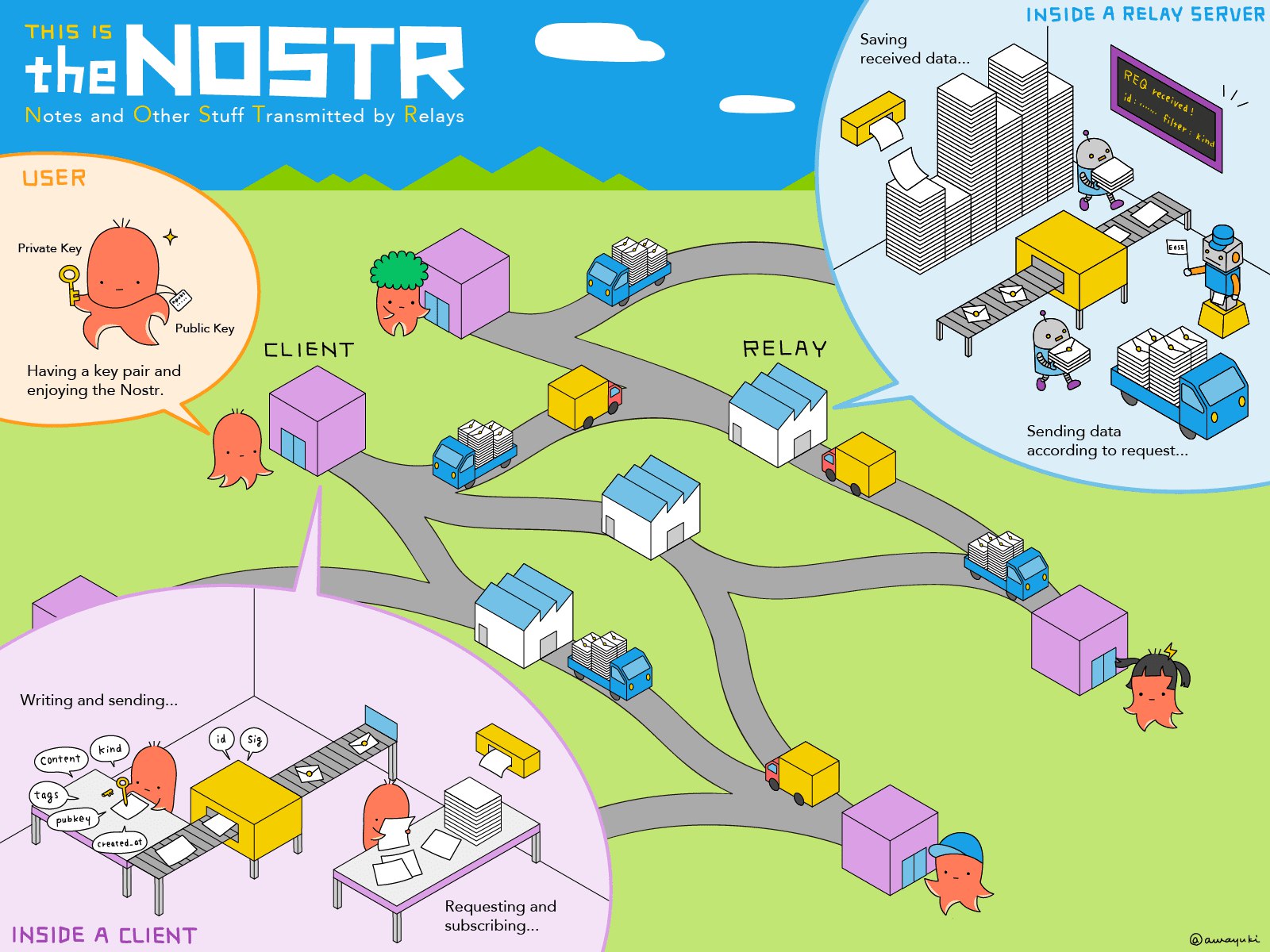
**Original source:** [https://xn--gckvb8fzb.com/run-a-nostr-relay-as-tor-hidden-service-on-openbsd/](https://xn--gckvb8fzb.com/run-a-nostr-relay-as-tor-hidden-service-on-openbsd/) **Shared with:** [ReadToRelay browser extension](https://github.com/vcavallo/ReadToRelay) --- Let’s set up and run our own *“private Twitter”* on Nostr, a simple, open protocol that enables truly censorship-resistant publishing on the web! [Nostr](https://nostr.com/), or *“Notes and Other Stuff Transmitted by Relays”*, is an open protocol that is designed for simplicity and censorship resistance, enabling decentralized publishing on the web. Even though the protocol allows publishing various content types, its most prominent use case so far have been social media status posts. Using client applications like Amethyst, Damus, and Iris, people can easily create a Nostr identity and join the flock of predominantly cryptocurrency enthusiasts. Today we’re going to set up our own, private Nostr relay, as a Tor Hidden Service, on OpenBSD, and connect to it using the Amethyst Android client, allowing us to run our own *“private Twitter”* for us and our like-minded tinfoil hatter friends. ## Preparation Usually, when I build an OpenBSD-based infrastructure, I use a [Vultr](https://www.vultr.com/?ref=9209123-8H) VPS instance. Even though Vultr allows running Tor on their service unless it’s an exit node, for this setup I’d suggest taking a look at a [different infrastructure provider](https://xn--gckvb8fzb.com/infrastructure/#infrastructure-providers) that is more focused on privacy and ideally accepts payments via [XMR](https://www.getmonero.org/get-started/what-is-monero/). > **Note:** I won’t explicitly mention under which user I’m running each command, hence please read carefully. When the prompt shows `bsdstr#`, I’m acting as `root` user, otherwise, when it shows `bsdstr%`, I’m the using the `_nostr` user. As soon as the OpenBSD VPS has booted, we can log in via SSH and perform a quick update of the system: ``` bsdstr# syspatch ``` ``` bsdstr# pkg_add -u ``` After that, let’s begin by installing some handy tools: ``` bsdstr# pkg_add git zsh neovim wget mosh rsync htop ``` What I like to do is link `nvim` to `vim`, because typing `vim` is in my muscle memory. I also like to use `zsh` as shell. Since that’s all preference, these steps are optional: ``` bsdstr# ln -s /usr/local/bin/nvim /usr/local/bin/vim bsdstr# chsh -s /usr/local/bin/zsh root ``` Another optional but useful thing that I like to do is to change the SSH port and disable password authentication / enable pubkey authentication. Make sure you have an `authorized_keys` entry with your pubkey in place before applying this change: ``` bsdstr# sed -i 's/^#Port 22/Port 31231/g;\ s/^#PubkeyAuthentication .*/PubkeyAuthentication yes/g;\ s/^#PasswordAuthentication .*/PasswordAuthentication no/g' \ /etc/ssh/sshd_config bsdstr# rcctl restart sshd ``` Afterwards, disconnect from SSH, and re-connect, ideally using `mosh`, and launch `tmux` for the sake of comfort. [See this post](https://xn--gckvb8fzb.com/automatically-upgrade-ssh-connections-to-mosh-when-available/) on how to make the `mosh` experience even smoother. ## Tor We begin by installing and configuring the Tor hidden service: ``` bsdstr# pkg_add tor bsdstr# cat /etc/tor/torrc ``` ``` Log notice syslog RunAsDaemon 1 DataDirectory /var/tor HiddenServiceDir /var/tor/hidden_service/ HiddenServicePort 80 127.0.0.1:8080 User _tor ``` Next, enable the Tor hidden service: ``` bsdstr# rcctl enable tor bsdstr# rcctl start tor ``` We can now check the hidden service’s [Onion address](https://en.wikipedia.org/wiki/.onion): ``` bsdstr# cat /var/tor/hidden_service/hostname xyz.onion ``` This is the address that our hidden service will be available at. ## Nostr Relay For the Nostr Relay we’re going to use the [`strfry`](https://github.com/hoytech/strfry) implementation. Nope, we won’t, because it’s a PITA to compile on OpenBSD, since some dependencies are not easily installable through `pkg_add`. For the Nostr Relay we’re going to use the [`nostr-rs-relay`](https://github.com/scsibug/nostr-rs-relay) implementation. Nope, we won’t either, because [it won’t build](https://github.com/scsibug/nostr-rs-relay/issues/187). ### Update 2024-08-16 [`nostr-rs-relay`](https://github.com/scsibug/nostr-rs-relay) has [fixed the OpenBSD build](https://github.com/scsibug/nostr-rs-relay/pull/205), meaning it could be used instead of `rnostr` as well. Given the project’s activity, it’s probably a wiser choice, hence I suggest looking into it. For the Nostr Relay we’re going to use the [`nostream`](https://github.com/Cameri/nostream) implementation. Nope, we won’t use that either, because screw Typescript, Node.js and NPM, as those became the [soy version](https://web.archive.org/web/20241107124702if_/https://storopoli.io/2023-11-10-2023-11-13-soydev/) of Spring, Java and Maven, and are a PITA to deal with these days; Let alone the security issues of half-baked or intentionally compromised NPM packages. For the Nostr Relay we’re going to use the [`rnostr`](https://github.com/rnostr/rnostr) implementation. Mainly because it’s fairly up-to-date and supports a couple more NIPs than my other choice, [Nex](https://github.com/lebrunel/nex). `#elixir` `#ftw` First, let’s install the required software to build the relay: ``` bsdstr# pkg_add git rust ``` Next, we can `git clone` and build it: ``` bsdstr# git clone https://github.com/rnostr/rnostr.git && cd rnostr bsdstr# mkdir config bsdstr# cp ./rnostr.example.toml ./config/rnostr.toml bsdstr# #https://github.com/rust-lang/cargo/issues/11435#issuecomment-1740163332 bsdstr# ulimit -n 1024 bsdstr# cargo build -r ``` **Note:** Feel free to adjust `./config/rnostr.toml` to your needs. Make sure `rnostr` listens on `127.0.0.1:8080`, by setting the following configuration: ``` [network] host = "127.0.0.1" port = 8080 ``` Then we’re going to *install* the binary and the configuration: ``` bsdstr# cp ./target/release/rnostr /usr/local/bin/ bsdstr# cp ./config/rnostr.toml /etc ``` Next we create the `_nostr` group and user on the system: ``` bsdstr# groupadd _nostr bsdstr# useradd -d /home/_nostr -m -c "Nostr" -g _nostr -L daemon -s /sbin/nologin _nostr ``` Now, create the `rc.d` file and adjust the permissions: ``` bsdstr# cat /etc/rc.d/rnostr #!/bin/ksh daemon="/usr/local/bin/rnostr relay -c /etc/rnostr.toml" daemon_user="_nostr" . /etc/rc.d/rc.subr rc_cmd $1 bsdstr# chmod 555 /etc/rc.d/rnostr ``` Then make sure to enable and start the service: ``` bsdstr# rcctl enable rnostr bsdstr# rcctl start rnostr ``` ## Nostr Client [![Amethyst displaying rnostr relay](https://xn--gckvb8fzb.com/run-a-nostr-relay-as-tor-hidden-service-on-openbsd/images/rnostr-amethyst_hu_9627dc2d3488bde8.webp)](https://xn--gckvb8fzb.com/run-a-nostr-relay-as-tor-hidden-service-on-openbsd/images/rnostr-amethyst.png) Amethyst displaying rnostr relay You should now be able to tell your client to connect to your `.onion` address by entering it as relay into your relays list. Depending on the client, you will probably have to configure Tor first. For my favorite client, [Amethyst](https://github.com/vitorpamplona/amethyst), you have to first install [Orbot](https://orbot.app/), activate it and then select *“Tor/Orbot setup”* in the hamburger menu to configure access through Orbot. **Note:** For Amethyst, make sure to enter the Onion address of the relay with a `ws://` prefix (e.g. `ws://xyz.onion`) until [this issue is resolved](https://github.com/vitorpamplona/amethyst/issues/760). * * * Your own private Nostr relay is now ready to go! At this point you can begin looking into more advanced configuration, e.g. for NIP-42 (auth), rate limiting and metrics. For securing/hardening the setup, I would recommend having a look at the *Darknet Opsec Bible*.

O Snowflake é um projeto de código aberto desenvolvido pelo Tor Project para ajudar a contornar a censura da Internet em locais onde o acesso ao Tor é bloqueado.

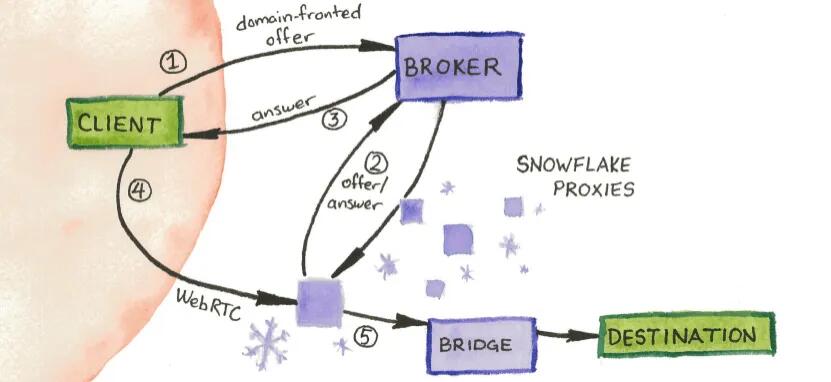
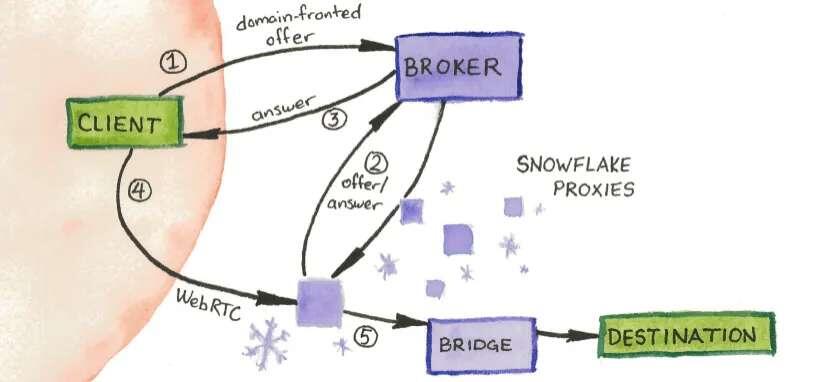
Ele é uma espécie de ponte do Tor que permite que os usuários se conectem à rede Tor por meio de um sistema distribuído de voluntários. A história do Snowflake começou em 2019, quando o Tor Project percebeu que muitas pessoas em locais com restrições de acesso à Internet estavam recorrendo a soluções de VPN e proxies para contornar a censura. No entanto, muitas dessas soluções eram bloqueadas pelas autoridades governamentais, o que criou a necessidade de encontrar novas maneiras de contornar a censura. Foi aí que surgiu a ideia do Snowflake, que foi lançado como uma solução para ajudar a aumentar a capacidade do Tor de contornar a censura da Internet em todo o mundo. O Snowflake funciona por meio de um sistema distribuído de voluntários que oferecem seus proxies para ajudar a contornar a censura. Quando um usuário se conecta ao Snowflake, seu tráfego é roteado por meio de um conjunto de proxies voluntários que se oferecem para ajudar a contornar a censura. Esses proxies são distribuídos em todo o mundo, o que ajuda a garantir que haja sempre uma opção disponível para os usuários que desejam acessar a Internet livremente. O Snowflake resolve o problema de acesso à Internet em locais onde o acesso ao Tor é bloqueado. Ele permite que os usuários contornem a censura e a vigilância da Internet, acessando sites e aplicativos que seriam bloqueados em suas regiões. Com o Snowflake, os usuários podem navegar na Internet com mais privacidade e segurança, evitando serem detectados pelos censores da Internet. "A privacidade é necessária para uma sociedade aberta na era eletrônica. Privacidade não é sigilo. Uma sociedade livre requer privacidade na comunicação, bem como privacidade na busca e na associação." - Eric Hughes https://snowflake.torproject.org/ https://youtu.be/ZC6GXRJOWmo

Onion Service Nostr Clients list

This is a list of nostr clients exposed as onion services. The list is currently actively maintained on [GitHub](https://github.com/0xtrr/onion-service-nostr-clients). Contributions are always appreciated! | Client name | Onion URL | Source code URL | Admin | Description | | --- | --- | --- | --- | --- | | Snort | http://agzj5a4be3kgp6yurijk4q7pm2yh4a5nphdg4zozk365yirf7ahuctyd.onion | https://git.v0l.io/Kieran/snort | [operator](nostr:nprofile1qyvhwumn8ghj7un9d3shjtnndehhyapwwdhkx6tpdshszxnhwden5te0wpuhyctdd9jzuenfv96x5ctx9e3k7mf0qqsx8lnrrrw9skpulctgzruxm5y7rzlaw64tcf9qpqww9pt0xvzsfmg9umdvr) | N/A | | moStard | http://sifbugd5nwdq77plmidkug4y57zuqwqio3zlyreizrhejhp6bohfwkad.onion/ | https://github.com/rafael-xmr/nostrudel/tree/mostard | [operator](nostr:nprofile1qyv8wumn8ghj7un9d3shjtnddaehgctjvshx7un89uq36amnwvaz7tmzdaehgu3wvf5hgcm0d9h8g7r0ddhjucm0d5hsqgy8wvyzw6l9pn5m47n7tcm5un7t7h5ctx3pjx8nfwh06qq8g6max5zadtyx) | minimalist monero friendly nostrudel fork | | Nostrudel | http://oxtrnmb4wsb77rmk64q3jfr55fo33luwmsyaoovicyhzgrulleiojsad.onion/ | https://github.com/hzrd149/nostrudel | [operator](nostrnpub1ktt8phjnkfmfrsxrgqpztdjuxk3x6psf80xyray0l3c7pyrln49qhkyhz0) | Runs latest tagged docker image | | Nostrudel Next | http://oxtrnnumsflm7hmvb3xqphed2eqpbrt4seflgmdsjnpgc3ejd6iycuyd.onion/ | https://github.com/hzrd149/nostrudel | [operator](nostr:npub1ktt8phjnkfmfrsxrgqpztdjuxk3x6psf80xyray0l3c7pyrln49qhkyhz0) | Runs latest "next" tagged docker image | | Nsite | http://q457mvdt5smqj726m4lsqxxdyx7r3v7gufzt46zbkop6mkghpnr7z3qd.onion/ | https://github.com/hzrd149/nsite-ts | [operator](nostr:nprofile1qqszv6q4uryjzr06xfxxew34wwc5hmjfmfpqn229d72gfegsdn2q3fgpz3mhxue69uhhyetvv9ujuerpd46hxtnfduqs6amnwvaz7tmwdaejumr0dsxx2q3a) | Runs nsite. You can read more about nsite [here](https://github.com/lez/nsite). | | Shopstr | http://6fkdn756yryd5wurkq7ifnexupnfwj6sotbtby2xhj5baythl4cyf2id.onion/ | https://github.com/shopstr-eng/shopstr-hidden-service | [operator](nostr:nprofile1qqsdxm5qs0a8kdk6aejxew9nlx074g7cnedrjeggws0sq03p4s9khmqpz9mhxue69uhkummnw3ezuamfdejj7qgwwaehxw309ahx7uewd3hkctcpzemhxue69uhksctkv4hzucmpd3mxztnyv4mz747p6g5) | Runs the latest `serverless` branch build of Shopstr. |

O Snowflake é um projeto de código aberto desenvolvido pelo Tor Project.

Para ajudar a contornar a censura da Internet em locais onde o acesso ao Tor é bloqueado. Ele é uma espécie de ponte do Tor que permite que os usuários se conectem à rede Tor por meio de um sistema distribuído de voluntários. A história do Snowflake começou em 2019, quando o Tor Project percebeu que muitas pessoas em locais com restrições de acesso à Internet estavam recorrendo a soluções de VPN e proxies para contornar a censura. No entanto, muitas dessas soluções eram bloqueadas pelas autoridades governamentais, o que criou a necessidade de encontrar novas maneiras de contornar a censura. Foi aí que surgiu a ideia do Snowflake, que foi lançado como uma solução para ajudar a aumentar a capacidade do Tor de contornar a censura da Internet em todo o mundo. O Snowflake funciona por meio de um sistema distribuído de voluntários que oferecem seus proxies para ajudar a contornar a censura. Quando um usuário se conecta ao Snowflake, seu tráfego é roteado por meio de um conjunto de proxies voluntários que se oferecem para ajudar a contornar a censura. Esses proxies são distribuídos em todo o mundo, o que ajuda a garantir que haja sempre uma opção disponível para os usuários que desejam acessar a Internet livremente. O Snowflake resolve o problema de acesso à Internet em locais onde o acesso ao Tor é bloqueado. Ele permite que os usuários contornem a censura e a vigilância da Internet, acessando sites e aplicativos que seriam bloqueados em suas regiões. Com o Snowflake, os usuários podem navegar na Internet com mais privacidade e segurança, evitando serem detectados pelos censores da Internet. "A privacidade é necessária para uma sociedade aberta na era eletrônica. Privacidade não é sigilo. Uma sociedade livre requer privacidade na comunicação, bem como privacidade na busca e na associação." - Eric Hughes https://snowflake.torproject.org/ https://youtu.be/ZC6GXRJOWmo